We photographed the shopping receipt
8 days before opening · 6 Nov 2026 · Michele Memoli, café owner · 3 min read
If you bought a lot of different things for your café or your kitchen, recording the trip was a chore. In our stock app, a shopping trip of fifteen things meant fifteen trips through the Restock sheet, one thing at a time.
The paper you were handed at the checkout already listed everything you bought. We asked: could we start from that?
Stock was only as good as its last entry. If the entries lagged behind the shopping, the numbers were wrong, and the Buy list was wrong with them. A maker I talked to kept a paper record every evening and ordered from it the next day. A way to record stock that took longer than the paper would lose to the paper.
From receipt to stock
You photographed the shopping receipt, with the camera or from your photos. We called it a Shopping receipt so it would never get mixed up with a Receipt, which was stock arriving.
Then a vision model read the photo. For each line it proposed which of your Items it was, and a quantity in that Item's Unit. A line reading "PRES BUTTER 250G x2" could come back as Butter, 0.5 kg. Reading saved nothing.
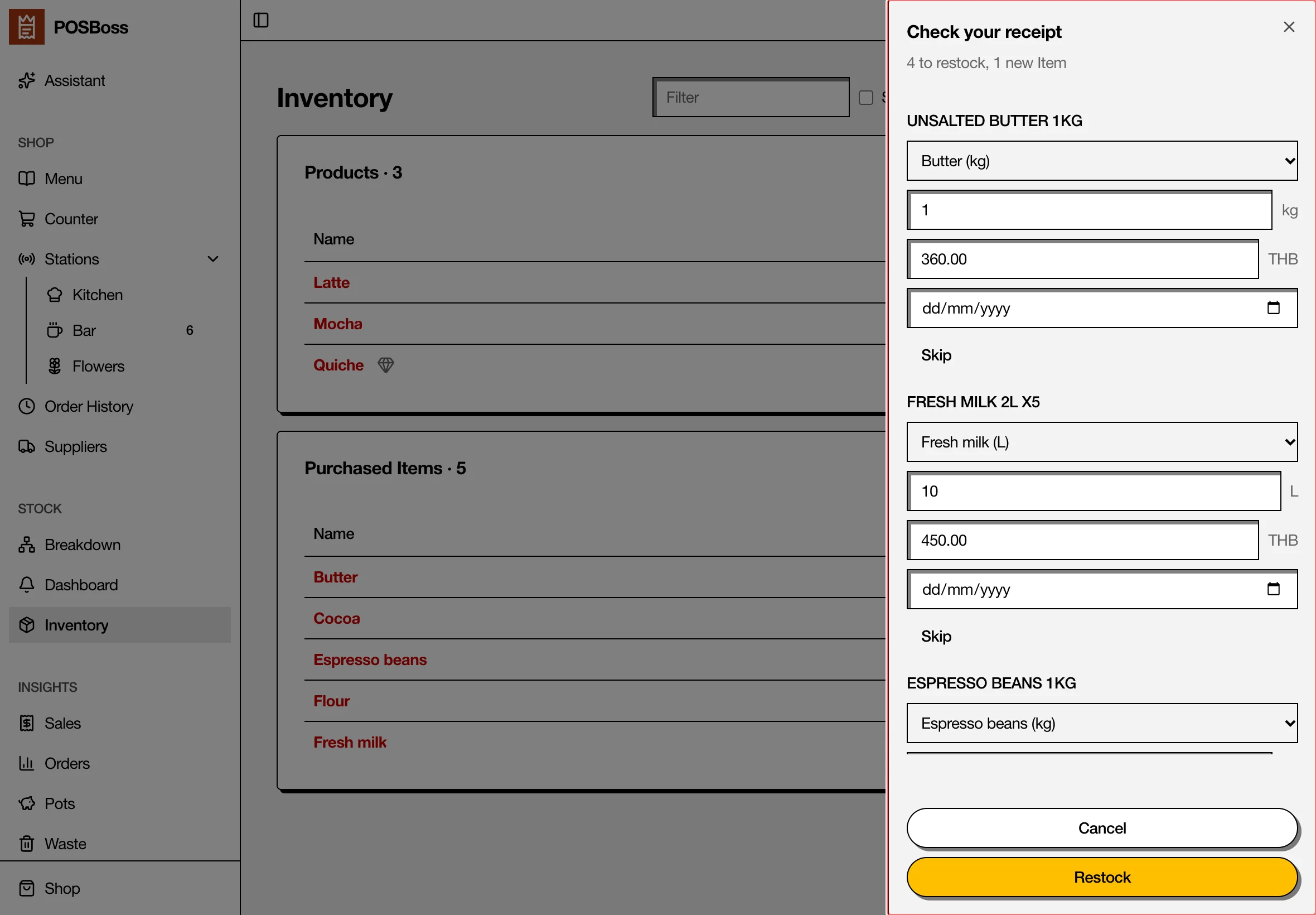
You checked the draft on a Summary screen. Each line showed the printed text next to the Item we thought it was, so a wrong match was easy to see. On each line you could:
- pick a different Item;
- turn it into a new Purchased Item, with a name and a Unit;
- correct the quantity;
- add an expiry date, which was blank unless you filled it in;
- skip it, for carrier bags, deposits and discounts.
When you pressed Restock, the whole receipt was recorded at once: the new Items, and one Receipt for each line you kept. It was all or nothing. If something was refused, nothing was saved and the problem showed on its own line. If you pressed Restock twice by mistake, or sent it again after a bad connection, it recorded once.
If the photo could not be read, you were asked to retake it. If the reader could not be reached, you could try again, and Restock on each Item still worked.
The button, Restock from receipt, was on the Dashboard and on the Items list.
What it will not do
It did not remember how a receipt named something, so every trip was matched afresh. It ignored prices. It read paper only: no PDFs or e-receipts. And it was a draft: a model could match a line to the wrong Item or misread a quantity. That was why you checked each line before anything was saved.
The photo, with the names and Units of your Items, was sent to the model provider to be read. Nothing else about you was sent.